 English
 Español
 Português
 русский
 Français
 日本語
日本語 Deutsch
 tiếng Việt
 Italiano
 Nederlands
 ภาษาไทย
 Polski
 한국어
한국어 Svenska
 magyar
 Malay
Malay বাংলা ভাষার
 Dansk
Dansk Suomi
Suomi हिन्दी
4.3-Inch 480×800 MCU Display FAQ for US Embedded Design Teams in 2026
Key Takeaways: HONGJIA HJ4301-03 MCU TFT LCD Module
Key Takeaways
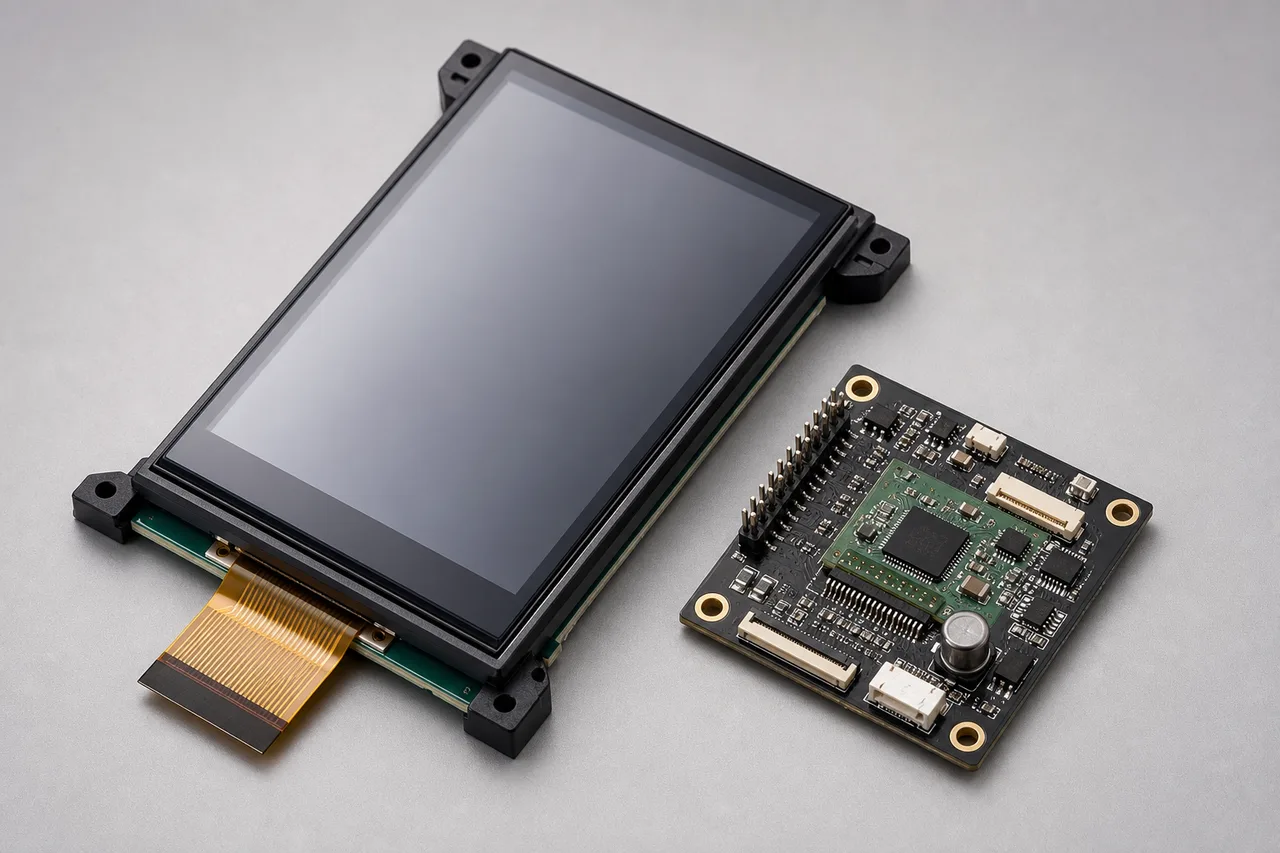
- The HONGJIA HJ4301-03 is a 4.3-inch transmissive IPS TFT LCD module with 480(RGB)×800 resolution.
- It supports 8-bit and 16-bit MCU interfaces for single-chip microcontroller designs.
- The module uses an HX8369A driver IC, a 30-pin connection, white LED backlight, and selectable brightness up to 500 cd/m².
- It is a practical fit for instruments, handheld terminals, POS equipment, smart-home controls, and other embedded products that need portrait-oriented resolution.
HONGJIA MCU Interface refers here to the module’s 8/16-bit parallel control interface, not a separate communications protocol. The display controller receives commands and pixel data from the host MCU through the module’s pin interface. That distinction matters during hardware selection: your microcontroller must provide the required parallel data bus, control signals, voltage levels, and enough transfer performance for the user interface you intend to show.
The HJ4301-03 combines a relatively compact 4.3-inch panel with a portrait-friendly 480×800 format. Its IPS construction supports all-direction viewing, while the transmissive TFT design uses a white LED backlight rather than relying on ambient light. For a US OEM, the main decision is not simply whether the panel is bright enough. It is whether the MCU, PCB layout, firmware driver, enclosure, and connector arrangement have been checked as one system.
FAQ: Choosing, Connecting, and Configuring a 4.3-Inch 480×800 MCU Display
A parallel MCU display can be a good choice when the product already uses a microcontroller and does not need a dedicated high-speed graphics processor. It can also expose weaknesses early. Engineers often confirm the resolution and connector count, then discover that the MCU lacks the right bus mode, the firmware library assumes a different controller, or the board cannot supply the backlight cleanly. Check the electrical interface before committing to a mechanical sample.
What changes when an MCU TFT display operates in 8-bit rather than 16-bit mode?
In 8-bit mode, each pixel transfer uses a narrower data bus, so the host typically needs more write cycles to send the same image data. Sixteen-bit mode carries more data per bus transfer and is usually the better choice when the MCU has the pins and firmware support available. Eight-bit mode can reduce pin count and simplify a compact PCB, but it may limit screen-refresh performance, animation smoothness, or the amount of time available for other control tasks.
Do not judge the two modes only by theoretical bus width. Your actual result depends on MCU clocking, command overhead, access timing, DMA support, display orientation, and how much of the screen changes at once. For a meter, keypad terminal, or appliance control panel with modest updates, 8-bit operation may be entirely adequate. For fast scrolling or frequent full-screen redraws, validate 16-bit mode first.
How do I confirm that my MCU is compatible with the HX8369A controller?
Start with the HJ4301-03 datasheet and your MCU reference manual. Confirm that the MCU can operate the required 8-bit or 16-bit parallel interface and that its GPIO or external memory controller can provide the display’s chip-select, register-select or data-command, write, reset, and read signals as applicable. Then check logic voltage compatibility, timing margins, reset behavior, and the host’s ability to send the HX8369A initialization sequence.
Controller compatibility is not guaranteed by resolution alone. Two 480×800 modules can use different drivers, pixel formats, command sets, and initialization requirements. Ask HONGJIA for the current HJ4301-03 datasheet and initialization information, then test the exact production MCU and board revision rather than a loosely similar development kit.
HJ4301-03 Specifications and MCU vs. MIPI, RGB, and 480×272 Display Options
The HJ4301-03 is aimed at designs that need a larger and taller user interface without moving to a more complex MIPI display architecture. Its 480(RGB)×800 resolution gives software more vertical space for menus, status information, numeric fields, and touch controls if a touch layer is added separately. The IPS panel is useful where operators view the instrument from different angles, although you should still evaluate glare, cover-lens reflection, and enclosure lighting in the finished product.
| Parameter | HONGJIA HJ4301-03 | Design implication |
|---|---|---|
| Display size | 4.3 inches | Fits compact instruments, terminals, and control panels |
| Resolution | 480(RGB)×800 | Portrait-oriented interface with more vertical content |
| Panel type | Transmissive IPS TFT LCD | Requires backlight; supports broad viewing directions |
| Interface | 8/16-bit MCU | Suitable for compatible single-chip microcontrollers |
| Driver IC | HX8369A | Firmware must use the correct controller sequence |
| Pins | 30 | Confirm connector, FPC, and PCB land pattern before layout |
| Brightness | Selectable up to 500 cd/m² | Verify the selected level against power and thermal limits |
MIPI can reduce pin count and suit processors with dedicated display interfaces, but it adds a different software and signal-integrity burden. RGB interfaces can support straightforward pixel streaming, yet they often consume more continuous interface resources. A 480×272 display costs less in pixels and memory, but it gives up the HJ4301-03’s taller working area. Choose based on host architecture and screen content, not on interface fashion.
How to Integrate the HJ4301-03: Pinout, Initialization, Backlight, and Sample Validation Steps
Integration should begin with the current pin assignment, not with a guessed Arduino library or a connector drawing copied from another 4.3-inch display. The 30-pin FPC arrangement, power rails, signal names, backlight pins, and reset requirements must come from HONGJIA’s documentation for this exact model. A mismatched FPC pinout can damage the module or produce a misleading partial failure.
- Confirm the host MCU’s 8-bit or 16-bit bus mode, signal voltage, timing, and available control pins.
- Match the HJ4301-03 pin assignment to the PCB footprint, including power, ground, data, control, reset, and backlight connections.
- Load the HX8369A initialization sequence supplied for the module. Do not substitute commands from a different panel revision without checking the driver documentation.
- Bring up the display at conservative settings, then verify reset behavior, pixel format, orientation, color order, and visible image alignment.
- Test the backlight separately for brightness selection, current behavior, startup timing, heat, and control from the final power circuit.
- Run a sample through cold start, repeated power cycles, full-screen color tests, partial updates, long idle periods, and the intended enclosure.
Pay special attention to the backlight driver. The panel’s selectable brightness is a display option, not permission to connect LED pins directly to an MCU GPIO. Use the electrical guidance in the datasheet and validate the completed assembly under the worst expected ambient and enclosure conditions. Before releasing tooling, request the HJ4301-03 pin assignment and sample support from HONGJIA.
HONGJIA’s Configurable TFT LCD Supply Approach for US OEMs: Verified Specifications, Custom Options, and Long-Term Continuity
For US OEMs, display sourcing is partly an engineering problem and partly a continuity problem. HONGJIA manufactures small- and medium-sized TFT LCDs, LCD modules, touch LCD and CTP products, long-strip LCDs, transflective LCDs, and OLED displays. Its stated product range covers named sizes from 1.14 to 10.1 inches, with a broader range extending to 15 inches. That matters when a product family may need several panel sizes or a later enclosure revision.
Ask for the controlled specification before approving a purchase order: current panel revision, driver IC, FPC drawing, brightness option, operating-temperature information, backlight requirements, and any touch or cover-lens changes. Small orders and customization can help during validation, but they do not remove the need for incoming inspection. Define what your team will check—dimensions, connector orientation, dead pixels, brightness consistency, startup behavior, and firmware compatibility—before samples arrive.
HONGJIA lists industrial instrumentation, medical equipment, smart home, communications equipment, household appliances, consumer electronics, POS, handheld PDA, and automotive electronic instruments among its application areas. If your product has a multi-year service life, discuss revision control and long-term supply early. A panel that works today is not enough if your field-replacement units must remain interchangeable.
Request the HJ4301-03 Datasheet, Pin Assignment, Initialization Support, or a Sample: https://www.lcdtftlcd.com/4-3-inch-480x800-interface-mcu.html
The fastest way to qualify this 4.3-inch 480×800 MCU display is to send HONGJIA your actual host details: MCU or processor part number, intended 8-bit or 16-bit mode, logic voltage, enclosure orientation, target brightness, backlight control method, and expected production quantity. Include a board photo or preliminary pin map if one exists. That gives the supplier enough context to confirm the interface rather than offering a generic panel answer.
Request the HJ4301-03 datasheet, 30-pin assignment, HX8369A initialization sequence, mechanical drawing, brightness options, and sample availability through the official HONGJIA 4.3-inch 480×800 MCU display page. Then test one sample on the intended MCU and PCB before freezing the connector or enclosure.
Start HJ4301-03 Sample Validation
Request the datasheet, pin assignment, initialization support, or a sample directly from HONGJIA before finalizing your embedded display design.
Visit Official Website →Send Inquiry


X
We use cookies to offer you a better browsing experience, analyze site traffic and personalize content. By using this site, you agree to our use of cookies.
Privacy Policy